Restaurant food cost control software
Know what every dish and every service really costs.
RestoVector connects recipe costs, supplier purchases, sales, waste and stock movements so restaurant owners can see what changed, how much it affected margin and where to investigate first.
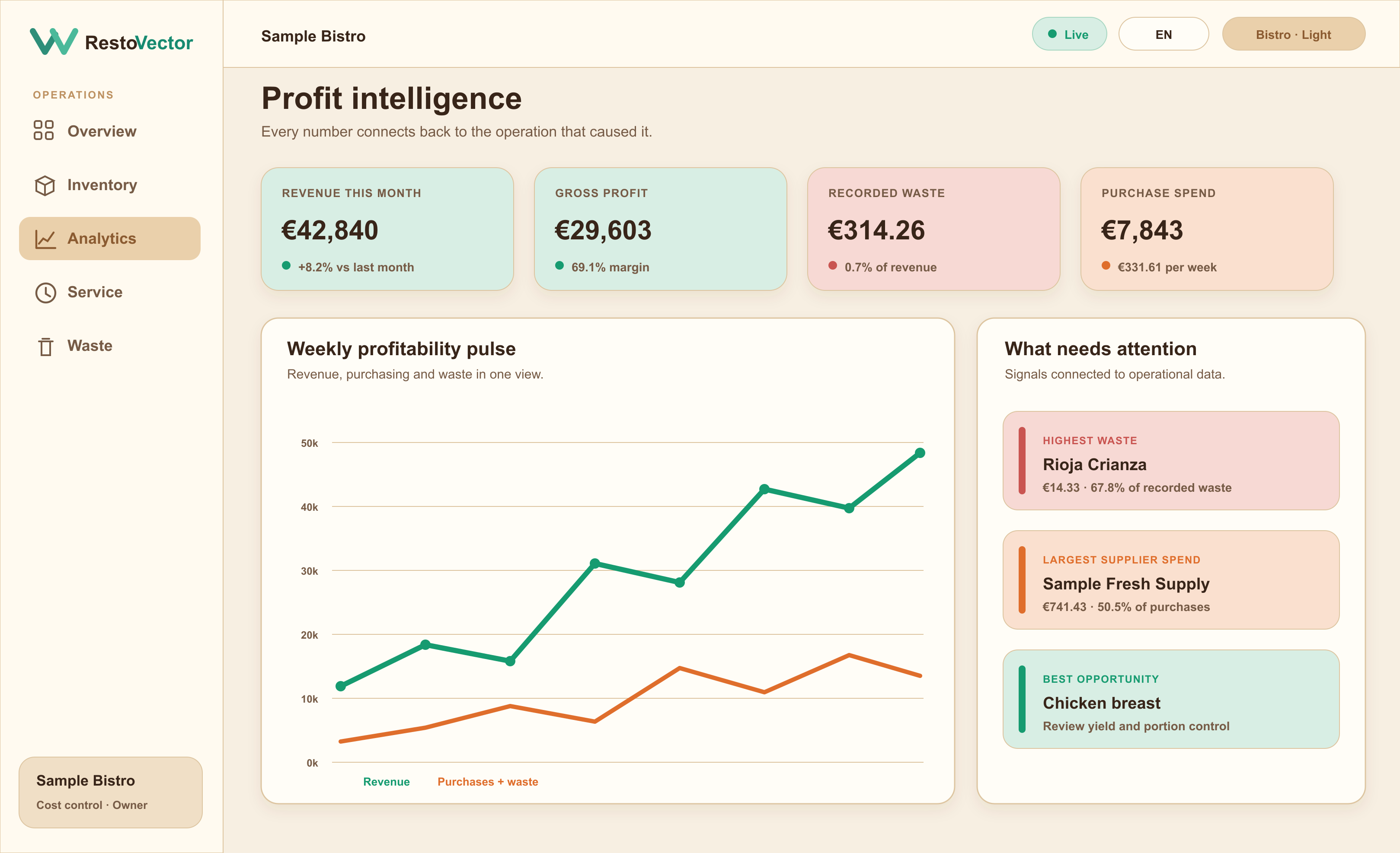
RestoVector is currently working with selected restaurants in a controlled pilot. The screen shown here uses example data; ask for a demonstration using a dish and supplier-price change you want to investigate.
The operational problem
Why restaurant food cost becomes unreliable
Sales, purchases, recipes and waste are often kept in separate systems or spreadsheets. That makes it difficult to explain whether a margin change came from supplier prices, portions, product mix, waste or missing records.
Calculate dish cost from real ingredients
Build recipes from inventory products and quantities. When ingredient prices change, the recorded dish cost and contribution can reflect the new purchase information instead of relying on an old spreadsheet.
- ✓ Ingredient quantities and units
- ✓ Recipe and sub-recipe costing
- ✓ Selling price, food cost and contribution
- ✓ Historical supplier price context
Connect sales to inventory and margin
In Full Cost Control mode, completed dish orders use their recipes to deduct ingredients and record their cost. Managers can review the evidence behind the result rather than seeing an unexplained percentage.
- ✓ Order-level revenue
- ✓ Recipe-based stock deductions
- ✓ Recorded ingredient cost
- ✓ Margin by dish and service
Find the causes behind cost changes
RestoVector brings purchasing, waste, usage and sales together so owners can compare periods and identify which products or operational changes deserve attention.
- ✓ Supplier price movements
- ✓ Waste cost by product and reason
- ✓ Inventory and usage variances
- ✓ Evidence-based management recommendations
Connected workflow
From a waiter order to a useful food-cost record
- 01A dish is ordered→
- 02Kitchen receives it→
- 03The bill is closed→
- 04Recipe ingredients are deducted→
- 05Cost and contribution update→
- 06Management reviews the drivers
Example: what a supplier price rise does to one dish
Illustrative calculation: a dish uses 200 g of an ingredient whose usable cost rises from €10 to €12 per kg. That adds €0.40 per dish. With 300 dishes sold, ingredient cost rises by €120 if the portion and sales quantity stay the same. This is an example, not a customer saving or a forecast.
- ✓ Keep supplier pack sizes and recipe units consistent.
- ✓ Check usable yield before comparing prices.
- ✓ Separate ingredient-cost changes from changes in selling price.
Prepare one dish before expanding the setup
Start with one menu item you know well. Gather its recipe quantities, usable yields, recent ingredient prices and selling price. Check those inputs against the source records before using its calculated margin to make a decision.
- ✓ Choose the restaurant and period being reviewed.
- ✓ Confirm ingredient units, portions and cost sources.
- ✓ Use Quick Start with manual stock while recipes are being prepared.
What to ask for in a food-cost software demo
Bring a recipe and a recent supplier invoice. Ask to see how their quantities and prices become a dish cost, how a completed order affects stock in Full Cost Control, and what remains unknown when records are missing.
- ✓ Trace the figure back to the ingredient and purchase record.
- ✓ Review a recorded waste event separately from recipe usage.
- ✓ Compare actual and theoretical cost using matching dates.
Who it is for
Designed for restaurants that want the reason, not only the ratio
RestoVector can begin in Quick Start mode with manual stock and move into Full Cost Control when recipes are ready. This lets an independent restaurant or multi-location group improve its records without configuring everything on day one.
- ✓Independent restaurants
- ✓Restaurant groups
- ✓Bars and cafés with food service
- ✓Hotel and hospitality restaurants
- ✓Owner-led and manager-led operations
Frequently asked questions
Restaurant food cost software questions
What is restaurant food cost software?
Restaurant food cost software connects ingredient purchase prices and recipe quantities with dish sales, waste and inventory movements so management can calculate and explain the cost of food sold.
Does RestoVector calculate the cost of each dish?
Yes. In Full Cost Control mode, a dish recipe contains its ingredients and quantities, allowing RestoVector to calculate recorded ingredient cost, food-cost percentage and contribution from available data.
What happens when a supplier changes a price?
Purchases retain price history. RestoVector can show the movement and its effect on product, recipe and margin analysis rather than silently replacing the previous context.
Can we start without entering every recipe?
Yes. Quick Start mode supports selling dishes and managing availability and stock manually. Restaurants can introduce recipes gradually before enabling full automatic costing.
What information should I prepare for a food-cost demo?
Bring a representative recipe, ingredient quantities and units, recent supplier prices and a selling price. For a period comparison, also bring matching sales and stock records. A demo can then show the calculation and where missing records limit the answer.
See RestoVector
See how it fits your restaurant operation.
Request a demonstration built around your service, kitchen, inventory and cost-control workflow.